
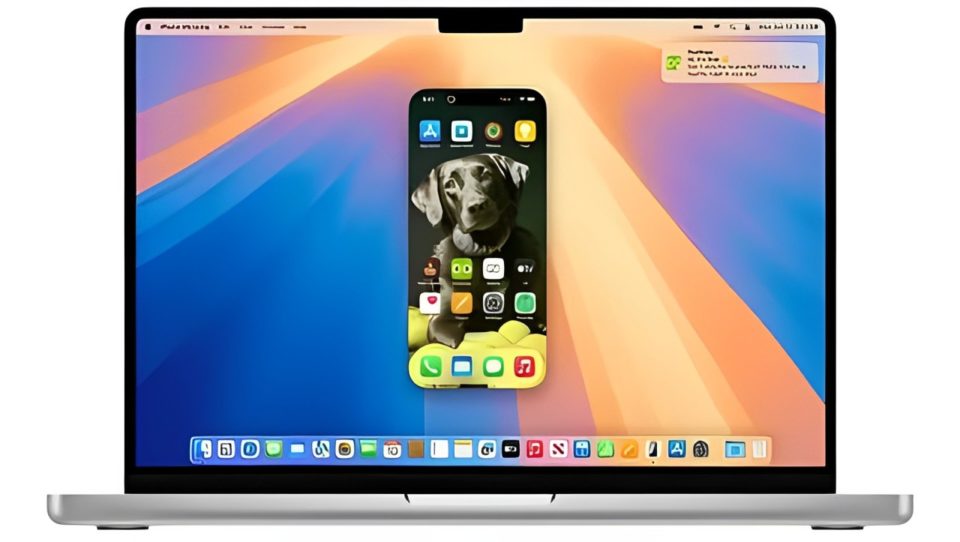
Apple recently unveiled macOS Sequoia, the latest upgrade to its operating system. Packed with new tools and enhancements, Sequoia promises to streamline workflows and boost productivity. However, if you’re a Windows 11 user, you might notice that many of Sequoia’s touted features feel quite familiar. Microsoft has already implemented several similar capabilities in its operating system.
Here’s a look at 5 macOS Sequoia features that Windows 11 users have been enjoying for a while.
Window Tiling and Organization
Apple’s macOS Sequoia introduces improved window management with a feature that allows users to quickly tile apps on their screen for better multitasking. You can easily snap windows into halves or quarters, similar to features seen in Stage Manager but now streamlined for everyday use.
How Windows 11 Already Does It:
Windows 11’s Snap Assist has been offering this functionality for a while. By dragging a window to the edges of your screen, Snap Assist automatically helps you organize multiple windows into grids—whether you want two, three, or four apps perfectly tiled. Additionally, Windows 11 includes preset snapping layouts for ultra-quick organization with a single click.
The Verdict: Sequoia may refine window management for macOS users, but Windows 11’s Snap Assist has been an essential multitasking tool for quite some time.
Passwords and Passkeys in Settings
Apple has introduced a Passwords section in macOS Sequoia’s System Settings, consolidating all your passwords and passkeys into one dedicated location. This allows users to manage, view, and organize their credentials securely without relying on third-party apps.
How Windows 11 Already Does It:
Windows 11 has a built-in Credential Manager where users can manage stored credentials like passwords for apps, websites, and networks. Combined with Windows Hello and Microsoft’s growing support for passkeys, Windows 11 already offers streamlined password and login management directly within its settings.
The Verdict: While macOS Sequoia introduces this feature as a new convenience, Windows 11 users have had credential management at their fingertips for years.
Gaming Mode for Optimized Performance
macOS Sequoia now prioritizes gaming performance with its new Game Mode, designed to reduce background processes and allocate system resources to deliver smoother gameplay and reduced latency.
How Windows 11 Already Does It:
Windows 11 has a dedicated Game Mode that does exactly the same thing. By enabling Game Mode, Windows automatically minimizes background tasks and prioritizes system performance for gaming. Windows 11 even integrates advanced tools like Auto HDR and DirectStorage to improve visuals and reduce load times for modern games.
The Verdict: Apple is finally addressing gaming performance with macOS Sequoia, but Windows has led the way in creating a gamer-friendly OS environment for years.
iPhone Mirroring and Device Integration
One standout feature of macOS Sequoia is iPhone Mirroring, which allows users to view and control their iPhone directly from their Mac. Notifications, apps, and messages are mirrored seamlessly, making the experience feel integrated.
How Windows 11 Already Does It:
Windows 11 users have access to a similar feature through Microsoft’s Phone Link app. With Phone Link, users can mirror notifications, respond to texts, make calls, and access photos from their Android or iOS devices on a Windows 11 PC. Samsung Galaxy users, in particular, benefit from deeper integration, including full app mirroring.
The Verdict: While Apple’s iPhone Mirroring is new to macOS users, Windows 11 has already paved the way with its robust Phone Link tool for a variety of devices.
Enhanced Virtual Desktops
macOS Sequoia brings improvements to Spaces, Apple’s virtual desktop tool, allowing users to manage separate desktop environments for work, entertainment, or personal tasks. It offers smooth transitions and better organization tools.
How Windows 11 Already Does It:
Windows 11’s Virtual Desktops feature provides a similar experience. Users can create multiple desktops for different tasks, name them, and customize each one with unique apps and wallpapers. Navigation between desktops is intuitive, and the Task View interface makes managing these workspaces effortless.
The Verdict: While macOS Sequoia refines its virtual desktop experience, Windows 11’s Virtual Desktops have offered flexibility and customization for quite some time.
Conclusion
While macOS Sequoia brings exciting new features to the Apple ecosystem, many of its standout tools—like window tiling, gaming optimizations, and phone integration—have long been part of the Windows 11 experience. Microsoft’s operating system continues to lead in areas like multitasking, gaming, and device connectivity, giving Windows users a head start on productivity and convenience.
For Mac users, Sequoia’s enhancements are a welcome improvement, but for those already on Windows 11, these features feel less groundbreaking and more like a familiar standard. In the ongoing rivalry between Apple and Microsoft, Windows remains a step ahead when it comes to user-friendly innovations.
