
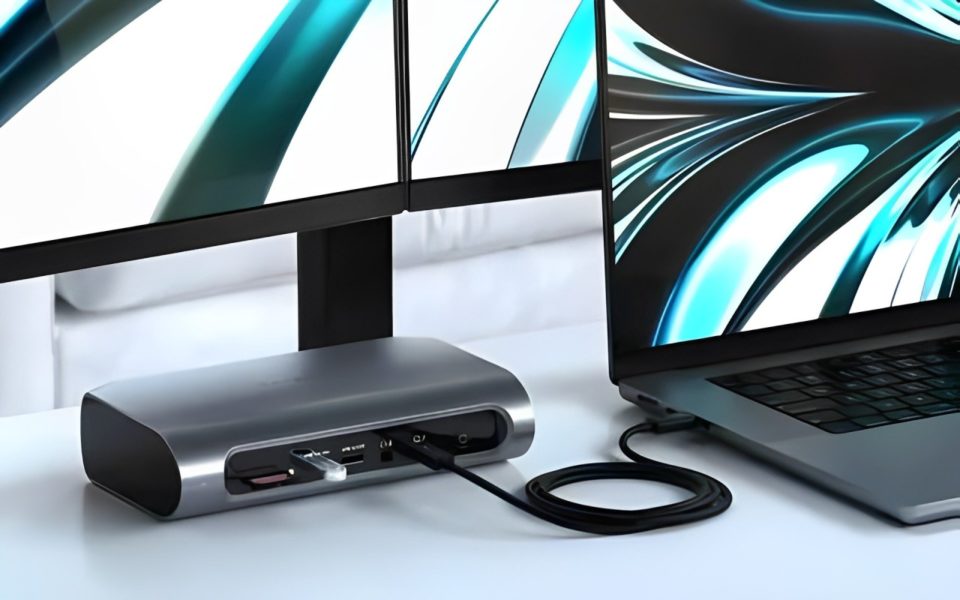
With remote work becoming the new norm, I found myself constantly moving my laptop around the house to find a productive workspace. But I missed the ease and efficiency of a fully equipped workstation, with multiple screens, a proper keyboard, and all the extra connections I needed at my fingertips. Then I discovered the power of a USB-C dock, and it was a game-changer, instantly transforming my laptop into a fully functional workstation.
Here’s what I’ve experienced and why I believe this small device can make a big difference.
Simple, One-Cable Solution
The beauty of the USB-C dock lies in its simplicity. I used to spend a few minutes every morning untangling cords and connecting my laptop to a charger, an external monitor, a mouse, a keyboard, and sometimes a backup hard drive. But with a USB-C dock, I only need to plug in a single cable, and my laptop instantly connects to all these peripherals.
This one-cable solution has saved me time and hassle, making my desk much tidier and cutting down on the wear and tear of constantly plugging and unplugging my devices.
Enhanced Multitasking with Multiple Monitors
One of the biggest benefits of the USB-C dock is the ability to connect multiple monitors. I often work with numerous documents, emails, and applications open at once, so screen real estate is essential. The dock lets me connect up to two additional monitors, allowing me to keep my main tasks front and center while keeping other essential tools and resources open on the side.
This setup has improved my productivity immensely. With more screen space, I’m able to work more efficiently, reducing the time I spend toggling between applications and giving me a clearer view of my projects.
Improved Connectivity for Devices
Another major perk of the USB-C dock is the increased connectivity options. My laptop has limited USB ports, which was always an issue when I wanted to connect a flash drive, external hard drive, or even a camera. With the dock, I suddenly have multiple USB ports, HDMI, Ethernet, and even SD card slots at my disposal.
This expanded connectivity is especially useful when I’m working on complex projects that require additional storage or when I need a stable, high-speed internet connection through Ethernet. The dock has made it so much easier to access everything I need without compromising speed or reliability.
Charging and Data Transfer All in One
Most USB-C docks offer power delivery, which means they can charge my laptop while connected. Gone are the days of using multiple chargers and dealing with tangled cables. Now, my laptop stays charged while I work, and I don’t have to worry about hunting for a wall outlet. Additionally, data transfer is fast and reliable, making it easy to back up files to an external drive or transfer large files between devices in a snap.
Audio and Video Perks for Virtual Meetings
Since I’m constantly on video calls, I appreciated that the USB-C dock also improved the quality of my online meetings. Some docks come with audio jacks and support for HD or even 4K video output, which has allowed me to connect my high-quality webcam and a dedicated microphone. As a result, my video and audio quality during calls have been much better, making meetings more seamless and professional.
Compact and Portable
Despite all the power it brings, the USB-C dock itself is compact and portable. I can easily unplug it, slip it into my laptop bag, and take it with me if I need to work from a different location. This convenience has made it an invaluable part of my work setup, especially when traveling or working from various places around the house.
Conclusion
Investing in a USB-C dock has transformed my laptop into a full workstation, combining productivity, efficiency, and organization in a single device. With its ability to connect multiple monitors, expand connectivity options, and provide a single-cable solution for power and data, it has simplified my work-from-home setup and brought new levels of functionality to my laptop.
For anyone looking to elevate their laptop experience, a USB-C dock might be the ideal solution, bringing the power of a desktop workstation wherever you need it.
