
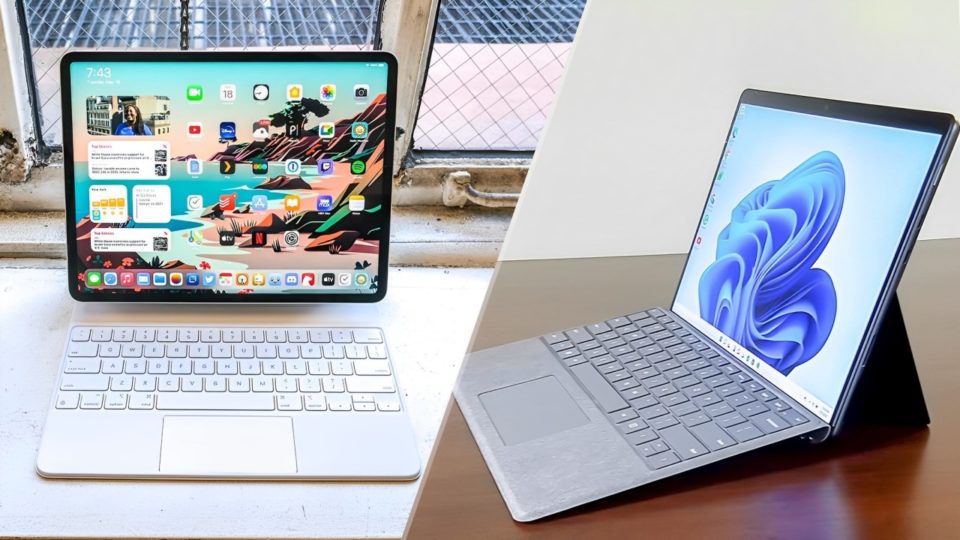
When it came time to upgrade my tablet, I was torn between two of the most powerful devices on the market: Apple’s M4 iPad Pro and Microsoft’s Surface Pro. Both devices boast impressive specs, versatile features, and sleek designs, making the decision far from easy. After hours of research and consideration, I decided to go with the M4 iPad Pro—and I’m glad I did. Here’s why the iPad Pro has proven to be the better choice for my needs and lifestyle.
The M4 Chip’s Unrivaled Performance
One of the key reasons I chose the M4 iPad Pro over the Surface Pro is the powerhouse performance of Apple’s M4 chip. From the moment I started using it, I could feel the speed and efficiency in everything I did—from multitasking between apps to rendering high-resolution video. The M4 chip offers unparalleled performance in comparison to the Surface Pro’s Intel processor, allowing me to run demanding applications without experiencing any slowdown.
Whether I’m editing videos, creating illustrations, or running multiple apps at once, the iPad Pro handles it all seamlessly. The fluidity and responsiveness of the device ensure that my workflow remains uninterrupted, which is essential for someone like me who uses it for both work and creative projects.
Superior Display Quality
The display is where the iPad Pro truly shines. Apple’s Liquid Retina XDR display is a visual treat, offering stunning colors, deep blacks, and high brightness levels that make every image and video pop. Whether I’m watching movies or working on design projects, the clarity and color accuracy are second to none.
In comparison, the Surface Pro’s display, while good, just doesn’t measure up to the iPad Pro’s quality. The vibrant screen of the iPad Pro makes a significant difference for creative professionals like me, especially when working on detailed illustrations or color-sensitive projects.
Seamless Integration with the Apple Ecosystem
One of the biggest advantages of choosing the M4 iPad Pro is how effortlessly it integrates with the rest of Apple’s ecosystem. As someone who already owns an iPhone and MacBook, the seamless connectivity between devices has been a game-changer. Features like Handoff, AirDrop, and Universal Clipboard make switching between devices incredibly convenient.
For example, I can start a project on my iPad, continue it on my MacBook, and share files with my iPhone instantly without having to rely on third-party apps or cloud services. This level of integration isn’t quite possible with the Surface Pro, which lacks the same fluidity when connecting with non-Windows devices.
Apple Pencil: A Game-Changer for Creativity
As a creative person, the Apple Pencil has become one of my favorite tools. The second-generation Apple Pencil offers a smooth, precise, and natural drawing experience that is unmatched by the Surface Pen. The responsiveness and tilt sensitivity make it feel as though I’m drawing on actual paper, which is essential for someone who spends a lot of time sketching, drawing, and taking notes.
In contrast, while the Surface Pen is a good stylus, it doesn’t offer the same level of precision or comfort that the Apple Pencil does. For anyone who values digital art or note-taking, the iPad Pro’s stylus experience is far superior.
The iPad Pro’s Portability and Battery Life
One of the main reasons I opted for the iPad Pro is its exceptional portability. It’s incredibly light and thin, making it easy to carry around, whether I’m commuting to work or traveling. The Surface Pro, while still portable, feels bulkier and less convenient for on-the-go use.
The iPad Pro’s battery life is also impressive. I can go a full day of heavy usage without needing to charge it, which is crucial for my busy schedule. The Surface Pro, on the other hand, struggles to match the battery longevity of the iPad Pro, especially when running more demanding applications.
iPadOS vs. Windows
While Windows offers a full desktop experience, I’ve found that iPadOS provides exactly what I need without the extra clutter. iPadOS is optimized for touch, offering a smooth and intuitive interface that makes navigating the device a breeze. With the addition of desktop-class features such as Stage Manager and multitasking, the iPad Pro now offers a more complete and versatile user experience.
Although Windows on the Surface Pro offers more flexibility in running desktop software, I’ve found that the app ecosystem on the iPad Pro has everything I need. The Apple App Store offers a wide variety of professional apps that run smoothly on the M4 chip, whether for creative work, productivity, or entertainment. The touch-first design of iPadOS makes for a more enjoyable user experience overall.
Security and Privacy
Apple’s commitment to security and privacy was another key factor in my decision. The iPad Pro uses Face ID, which I find more convenient and secure than the Surface Pro’s facial recognition. Apple’s strong stance on privacy also gives me peace of mind when it comes to protecting my data and personal information.
Additionally, Apple’s regular updates to iPadOS ensure that my device stays secure and that I always have access to the latest features. In comparison, the update schedule for Windows devices can be less frequent and reliable.
Conclusion
After using the M4 iPad Pro for a while, I’m confident that I made the right choice over the Surface Pro. The incredible performance of the M4 chip, the vibrant display, seamless integration with the Apple ecosystem, and the outstanding Apple Pencil have all made my experience with the iPad Pro both enjoyable and efficient. While the Surface Pro has its merits, for me, the iPad Pro stands out as the superior device for creative professionals and everyday users alike.
If you’re in the market for a new tablet and are deciding between the iPad Pro and the Surface Pro, I’d strongly recommend considering the M4 iPad Pro—it’s an investment in performance, creativity, and convenience.
