

Best n8n Alternatives in 2026: 7 Powerful Automation Tools Compared
Automation has become an important part of modern businesses. From managing customer information to sending emails, processing orders, and connecting different applications, automation helps people save time and reduce repetitive work.
One popular platform in this space is n8n. It allows users to build workflows by connecting applications, APIs, and services. However, n8n is not the only option available. Several other platforms offer powerful automation features, easier interfaces, and different hosting options.
If you are looking for the best n8n alternatives, this guide compares seven popular tools that can help individuals, developers, and businesses automate their daily tasks in 2026.

What Is n8n and Why Look for Alternatives?
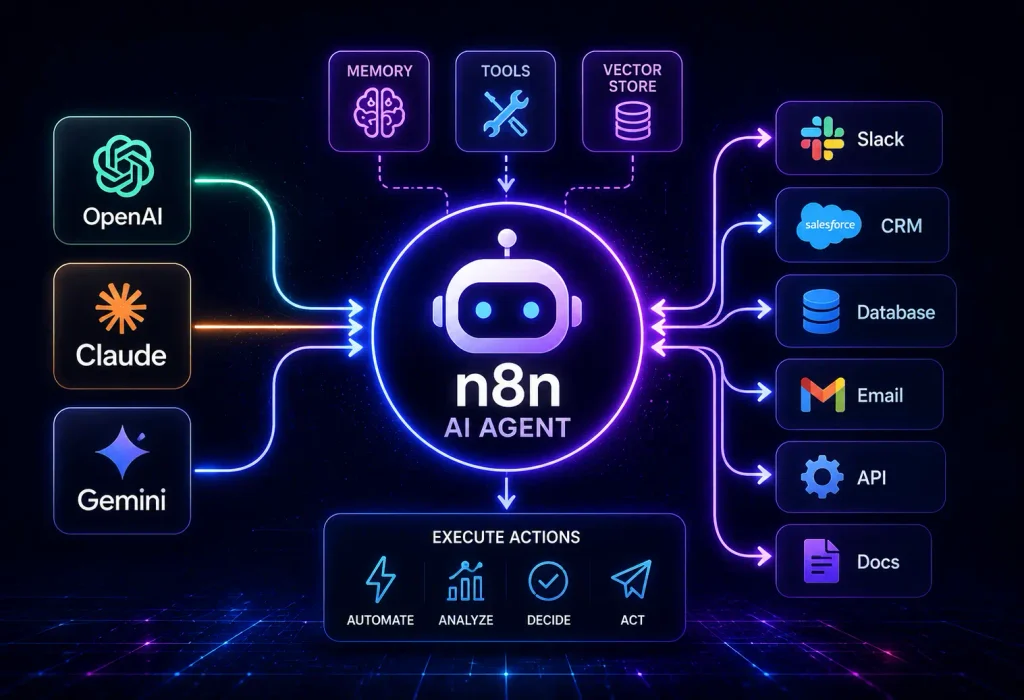
n8n is a workflow automation platform that connects different applications and services. Users can create workflows using a visual editor, triggers, actions, and custom code.
For example, you can create a workflow that automatically saves website form submissions to a spreadsheet, sends a notification, and adds the customer to a CRM system.
Although n8n offers flexibility, some users look for alternatives because:
- They prefer a simpler interface.
- They do not want to manage their own hosting.
- They need specific application integrations.
- They want different pricing options.
- They need tools designed for developers or enterprise teams.
The right platform depends on your technical skills, budget, and automation requirements.
7 Best n8n Alternatives in 2026
Here are seven automation platforms worth considering.
1. Zapier – Best for Beginners
Best for: Beginners, freelancers, and small businesses.
Zapier is one of the most popular automation platforms. It allows users to connect thousands of applications and create automated workflows without writing code.
Its simple interface makes it suitable for people who want to automate everyday business tasks quickly.
Key features:
- Large library of application integrations.
- Easy workflow creation.
- Multi-step automation.
- Automated notifications and data transfers.
- AI-powered workflow capabilities.
Why choose it?
Zapier is a strong choice for users who want simple automation without managing servers or dealing with complex technical settings.
2. Make – Best for Visual Automation
Best for: Users who need complex visual workflows.
Make, previously known as Integromat, provides a visual workflow builder that makes it easier to understand how data moves between applications.
Users can create workflows with multiple steps, filters, conditions, and different routes.
Key features:
- Visual workflow builder.
- Advanced filters and routing.
- Data transformation tools.
- Application integrations.
- Multi-step automation scenarios.
Why choose it?
Make is a good option for people who want more visual control over their workflows and need to build complex automation without extensive programming.
3. Activepieces – Best Open-Source Alternative
Best for: Users interested in open-source and self-hosted automation.
Activepieces is a workflow automation platform that offers a visual interface and supports self-hosting.
It is particularly interesting for users who want more control over their automation environment while avoiding some of the complexity associated with managing workflows manually.
Key features:
- Visual workflow builder.
- Self-hosting options.
- Application integrations.
- AI-related automation capabilities.
- Customizable workflows.
Why choose it?
Activepieces is one of the strongest options to explore if you want an open-source alternative with a user-friendly approach.
4. Pipedream – Best for Developers
Best for: Developers and technical teams.
Pipedream is designed for users who need more control over APIs, webhooks, and custom code.
Unlike beginner-focused automation tools, Pipedream gives developers the flexibility to write code directly inside workflows.
Key features:
- API and webhook integrations.
- Custom code steps.
- Event-driven workflows.
- Developer-friendly environment.
- Integration with external services.
Why choose it?
Pipedream is worth considering if your automation depends heavily on APIs, custom scripts, and developer-level functionality.
5. Microsoft Power Automate – Best for Microsoft Users
Best for: Businesses using Microsoft 365.
Microsoft Power Automate helps businesses automate processes across Microsoft applications and other connected services.
It works particularly well with tools such as Outlook, Excel, SharePoint, Teams, and other Microsoft products.
Key features:
- Microsoft 365 integration.
- Automated cloud workflows.
- Desktop automation.
- Business process automation.
- AI-assisted capabilities.
Why choose it?
If your organization already uses Microsoft products, Power Automate can make it easier to connect business processes within that environment.
6. Node-RED – Best for IoT Automation
Best for: Developers, IoT projects, and event-driven automation.
Node-RED is a flow-based programming tool that allows users to connect hardware devices, APIs, and online services.
It is widely used in projects involving sensors, smart devices, and connected systems.
Key features:
- Browser-based flow editor.
- Hardware and IoT integrations.
- API connections.
- Custom JavaScript functions.
- Self-hosting capabilities.
Why choose it?
Node-RED is a practical choice for technical users who want to build event-driven workflows, especially when working with IoT devices.
7. Workato – Best for Enterprise Automation
Best for: Large organizations and enterprise teams.
Workato is designed for businesses that need to connect multiple enterprise applications and automate complex processes.
It supports business integrations across departments, helping organizations reduce manual work and improve operational efficiency.
Key features:
- Enterprise application integrations.
- Complex workflow automation.
- Business process management.
- Data synchronization.
- Governance and administrative controls.
Why choose it?
Workato is worth considering for organizations with advanced integration requirements, although its enterprise-focused approach may not suit smaller budgets.
Best n8n Alternatives: Quick Comparison
The following table summarizes what each platform is best suited for.
| Automation Tool | Best For | Main Advantage |
|---|---|---|
| Zapier | Beginners | Easy setup |
| Make | Visual workflows | Advanced visual automation |
| Activepieces | Open-source users | Self-hosting options |
| Pipedream | Developers | Custom code and APIs |
| Power Automate | Microsoft users | Microsoft integration |
| Node-RED | IoT projects | Event-driven automation |
| Workato | Enterprises | Business integrations |
Pricing, usage limits, and available integrations vary between platforms. Check each provider’s official website before choosing a paid plan.
How to Choose the Right Automation Tool
Choosing between the best n8n alternatives depends on what you want to automate. Before making a decision, consider these factors:
1. Ease of Use: If you are new to automation, choose a platform with a simple interface and ready-made integrations.
2. Integration Support: Make sure the platform supports the applications, APIs, and services you already use.
3. Pricing: Compare subscription costs, usage limits, and how each service calculates automation activity.
4. Hosting and Security: Decide whether you prefer managed cloud hosting or want to host the automation platform on your own server.
5. Scalability: Consider whether the tool can support your future business requirements as workflows become more complex.
Frequently Asked Questions
What is the best alternative to n8n?
Make is a strong choice for visual automation, Zapier is suitable for beginners, and Activepieces is worth exploring for self-hosted automation.
Are there free n8n alternatives?
Yes. Some platforms, including Activepieces and Node-RED, offer free self-hosting options. Other platforms provide free plans with usage limits.
Which n8n alternative is best for beginners?
Zapier is a good starting point because of its simple interface and large integration library.
Which automation tool is best for developers?
Pipedream and Node-RED are useful choices for developers who need custom code, APIs, webhooks, and more technical control.
Can automation tools use artificial intelligence?
Yes. Several automation platforms support AI-related workflows, such as processing text, connecting AI services, and automating tasks that involve language models. The available features depend on the platform and plan.
Final Thoughts
Automation can help businesses and individuals save time, improve productivity, and reduce repetitive tasks. While n8n remains a flexible option, it is not the only platform available.
Zapier is ideal for beginners, Make offers powerful visual workflows, Activepieces provides a self-hosting option, and Pipedream gives developers more control. Microsoft Power Automate, Node-RED, and Workato also serve specific business and technical needs.
The best choice is the one that matches your workflow requirements, technical experience, budget, and long-term goals. Compare the available features before moving your existing automations to another platform.
Useful Resources
- n8n: https://n8n.io/
- Zapier: https://zapier.com/
- Make: https://www.make.com/
- Activepieces: https://www.activepieces.com/
For more articles like this visit our website MediaRay.blog
